

What if the biggest challenge isn’t protecting your screen, but working out which cable goes with which device after the move? Packing electronics for moving can feel like a lot to keep track of, especially when you’re protecting delicate parts and trying to keep accessories organised.
Electronics need thoughtful packing. A suitable box, cushioning and a little preparation can help reduce knocks and stop devices shifting in transit. Keeping cables and accessories with the right equipment also makes setting everything up in your new home easier.
This step-by-step guide explains how to prepare your devices, disconnect and label cables, and choose protection for different shapes and levels of fragility. You’ll also learn how to pack boxes securely and mark them clearly, helping you stay organised from packing day to unpacking.
Key Takeaways
- For packing electronics for moving, start by photographing connections, backing up important data and powering devices down before disconnecting them.
- Match the wrapping and handling to each device’s shape and fragility, and follow the manufacturer’s guidance.
- Use original packaging if it’s suitable, or choose a well-fitting cardboard box with room for cushioning and no space for the device to shift.
- Label each box with its contents, destination room and any relevant handling notes.
- Use your labels, connection photos and inventory to reconnect devices, then check that accessories are accounted for before putting protective packaging away.
Packing electronics for moving: prepare devices before you wrap them
A misplaced cable can leave you guessing at the other end, while rushed disconnection or handling can lead to avoidable knocks. A little preparation makes packing electronics for moving easier to manage and helps keep each device with its accessories.
Start by recording how each device is connected and protecting important files. Then power everything down and disconnect it carefully. Electronics can be affected by physical knocks and other factors. Electronic packaging principles explain why suitable protection matters, including protection from mechanical damage and electrostatic discharge.
What should you do before disconnecting electronics?
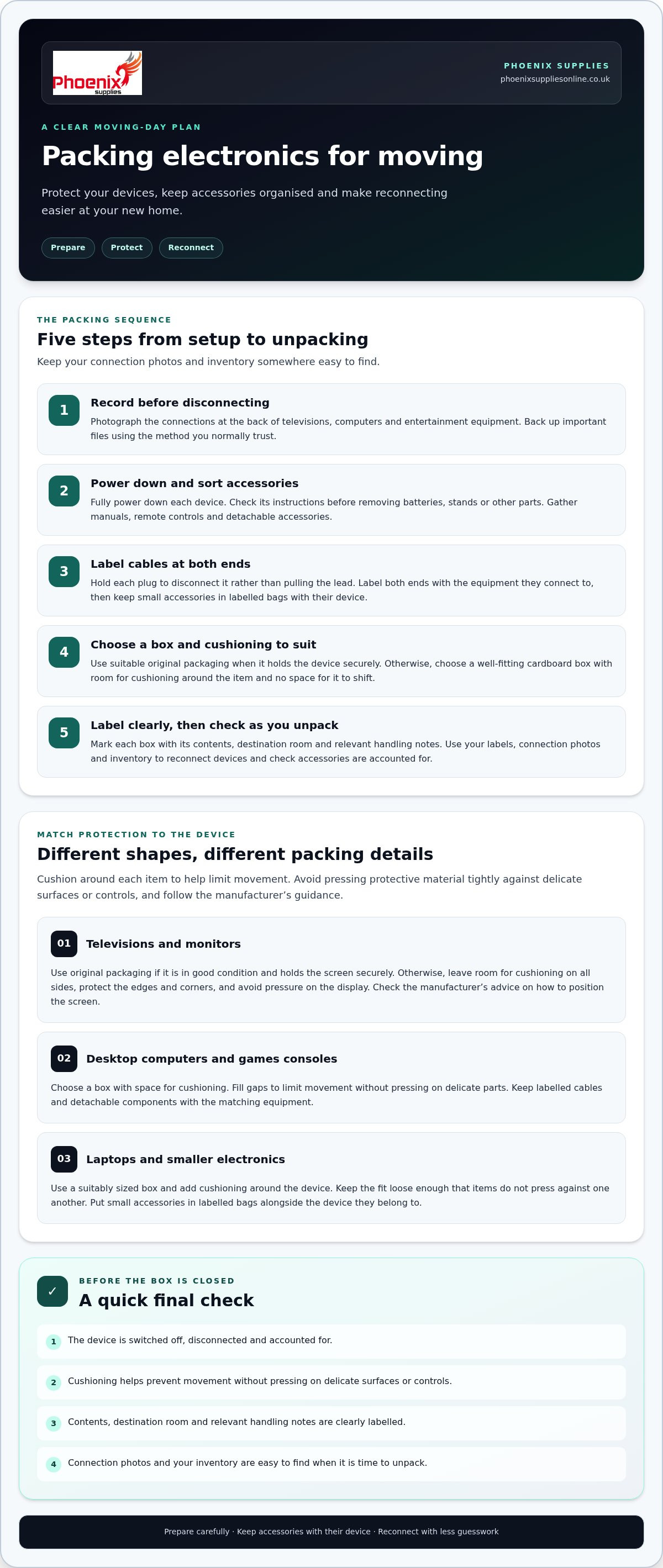
Start with televisions, computers and entertainment equipment. Photograph the connections at the back of each device before removing any leads. The pictures will help you match cables to sockets later. Back up important files using the method you normally trust, then fully power down each device before unplugging it.
- Gather manuals, remote controls and detachable accessories so they’re ready to pack with the right device.
- Check the manufacturer’s instructions before removing batteries, stands or other detachable parts. Designs differ, so don’t force a component that doesn’t come away easily.
- Disconnect cables by holding the plug rather than pulling on the lead.
How can you keep cables and accessories organised?
Label each cable at both ends with the device it belongs to. For example, mark a television lead “TV” at both ends rather than relying on memory. Put small accessories in labelled bags and keep each bag with its matching device. A simple inventory can list each device, its cables and any components packed separately.
Keep labels short, clear and readable once the leads are bundled. If a cable connects two devices, identify both ends by the equipment they connect to rather than labelling it only as “cable”. Add manuals and remote controls to your inventory so you can check what should be there when you unpack.
Before wrapping anything, check that each device is switched off, disconnected and accounted for. Keep the photographs and inventory somewhere easy to find, such as with your moving notes, rather than inside a box you’ll open later. This gives you a clear record to refer to during packing and unpacking.
How to Pack Electronics: From Screens to Small Devices
Different devices need different packing approaches. A broad screen, a desktop computer and a small games console have different shapes and vulnerable parts, so choose the box and cushioning to suit each item. Follow the manufacturer’s guidance, especially if it includes instructions for transport or packing.
Protect the device and stop it shifting. Cushion around the item so it stays in place, but don’t press protective material tightly against delicate surfaces or controls. A professional packing guide can offer another reference for packing methods, but follow your device instructions for advice specific to your equipment.
How should you protect a television or computer monitor?
Use the original packaging if it’s in good condition and holds the screen securely. Its shaped inserts may help keep the device in position. If you don’t have suitable original packaging, choose a box that leaves room for cushioning on all sides. Protect the edges and corners, and arrange cushioning so it doesn’t press on the screen itself. Fill gaps to prevent the screen sliding around, then close the box without forcing it shut. For more screen-specific advice, see the existing guide on the best TV moving box UK.
Check the manufacturer’s advice on how to position your particular screen in its box. Don’t assume every television or monitor should be packed in the same way.
How should you pack computers, consoles and smaller devices?
For a desktop computer or games console, select a box with enough space for cushioning around the device. Arrange protective material to limit movement without pressing on delicate parts. Keep detachable components and labelled cables with the matching equipment. If you pack a stand, accessory or part separately, label it clearly so it’s easy to identify later.
Laptops and smaller electronics are usually easier to fit into a suitably sized box. Add cushioning around the device, taking care not to make the box so tight that items press against one another. Put small accessories in labelled bags and keep them alongside the device they belong to.
- Screens: Cushion the edges and corners, and avoid pressure on the display.
- Desktop equipment and consoles: Use a well-fitting box and fill gaps to prevent movement.
- Laptops and accessories: Keep them together with clearly labelled cables and components.
If you’re unsure how to pack a device or removable part, check the manufacturer’s instructions. Phoenix Supplies UK offers moving boxes and bubble wrap to help you prepare different items for a move. Browse moving boxes and bubble wrap to see the available packaging materials.
Original packaging or protective materials: what works best for moving electronics?
The right choice depends on the device, the condition of its packaging and how securely everything fits. When packing electronics for moving, start with the manufacturer’s box if it’s clean, intact and suitable. If it isn’t available or no longer holds the item firmly, choose a cardboard box with enough room for cushioning but not so much space that the device can shift.
Is the original box the best choice for every device?
Original packaging can be convenient because its inserts may be shaped to hold a particular device. Check that the box is dry and undamaged, and that all inserts and protective pieces are present and fit securely. If they’re missing, worn or loose, the box may not keep the device in place. Use a suitable replacement box instead, with cushioning arranged around the item.
Compare the options before you pack:
| Option | Use case and advantages | Checks |
|---|---|---|
| Original packaging | A device that fits its own box and inserts securely. | Check the box and inserts are intact, clean and a snug fit. |
| Cardboard box | A replacement when the original is missing or unsuitable. | Choose a size that allows cushioning but prevents movement. |
| Bubble wrap | An option for cushioning a device or protecting exposed edges. | Use it as part of the packing, not as a substitute for a suitable box and careful positioning. |
Which protective materials can help cushion electronics?
No single material suits every device. Consider the item’s size, shape and fragility. Use cushioning around exposed edges and in gaps so the equipment stays in position. Avoid packing so tightly that the material presses against the device or its delicate parts. If the manufacturer gives specific advice on packing materials, follow it.
Before sealing the box, gently check whether the device moves when you carefully tilt the box. If it shifts, adjust the cushioning or choose a better-fitting box. The aim is to keep the device secure without putting pressure on it.
A packing materials list for moving can help you plan supplies for other household items as well as electronics. Choose each material for the job it needs to do, then check that the packed device is supported on all sides before closing the box.
How to label, load and handle packed electronics on moving day
Clear labels help you and anyone handling the boxes identify what’s inside, where it needs to go and how to treat it. As you finish packing electronics for moving, use plain wording that can be read quickly. Keep personal details, passwords and account information off the outside of the box.
What should you write on electronics boxes?
Name the device category and destination room, such as “Monitor, home office”. Add relevant handling notes, such as “Keep upright”, if that suits the device and its packaging. If a labelled cable bag or accessory pack is stored with another item, note that too. Avoid vague labels such as “miscellaneous”, which won’t help you match items during unloading.
Use a short checklist before the boxes leave the house:
- Write the contents and destination room in clear, readable text.
- Mark any handling notes that apply to that specific device or its packaging.
- Check that cable and accessory labels match the device they belong to.
- Keep personal data and account details in your records, not on the box.
How should you place electronics boxes during the move?
Lift boxes carefully and support them from underneath. If a box is awkward to carry, get help rather than trying to manage it alone. Follow any handling instructions supplied with the device or packaging. Keep boxes upright when their shape and packing allow, and place them on a stable surface so they’re less likely to tip or slide.
Give electronics boxes their own space. Keep them away from items that could press against them or fall onto them. Don’t place heavier boxes on top, even if the electronics box looks firm. Before setting off, check that each box is closed securely and that nothing inside shifts when you move it gently. If the manufacturer gives specific instructions for carrying or positioning a device, follow those over general advice.
Choose boxes and protective materials to suit each device’s size, shape and fragility. Phoenix Supplies UK stocks moving boxes and bubble wrap for preparing different items. Check the box fit and the protection each device needs before choosing your supplies.
Browse Phoenix Supplies UK’s packaging materials to find boxes and bubble wrap for your move.
Unpacking electronics after moving: reconnect devices with less guesswork
Once your boxes are in the right rooms, use the labels, photographs and inventory you made before the move to reconnect equipment in an orderly way. Preparing carefully when packing electronics for moving can save time later. You can match each device to its cables and accessories instead of sorting through everything at once.
How can you reconnect devices without losing track of cables?
Start with one device at a time. Check its box label and inventory entry, then compare the cables and accessories against your notes. For a television or computer, use your pre-move photograph to match each cable with its original port. Keep manuals and setup notes nearby, and follow the manufacturer’s instructions if you’re unsure how to reconnect or set up a device.
Before putting away any protective packaging, check that the device and its listed accessories are present. Keep parts packed separately with their matching equipment until you’ve confirmed everything is accounted for. If something is missing, your inventory can help you work out which box to check.
- Match the device to its box label and inventory entry.
- Use photographs to guide cable connections.
- Check for remote controls, detachable parts and other listed accessories.
- Keep manuals and setup notes accessible while reconnecting.
Take a moment to check each item before switching it on. If you spot a concern, refer to the device instructions rather than guessing. Once everything is accounted for and set up, decide which packaging to keep for future use and which to put away.
Where can you find boxes and protective materials for your move?
For a move or other items that need packing, choose a box and cushioning to suit the item’s size, shape and fragility. Phoenix Supplies UK stocks moving boxes in various sizes, along with bubble wrap and other protective materials. The family-run business has an office team available to help with questions about its packaging materials.
Explore Phoenix Supplies UK’s packaging materials to see whether its boxes and bubble wrap suit your needs. Check the current delivery terms, including any exclusions and which items are eligible, before ordering if delivery details matter to your plans.
Get your electronics ready for a smoother move
Careful preparation makes packing electronics for moving easier and helps protect devices in transit. Photograph connections, back up important files and follow manufacturer instructions before disconnecting equipment or removing any parts. Use original packaging if it’s in good condition and holds the device securely, or choose a suitable box with cushioning to prevent it shifting.
Clear labels, cable notes and a simple inventory make it easier to match devices with their accessories and reconnect them after the move. Unpack and check each item before putting its protective materials away.
Phoenix Supplies UK is a family-run supplier with a range of moving boxes and protective materials, including bubble wrap. You can browse its packaging supplies online and check the current delivery terms before ordering.
Browse Phoenix Supplies UK’s packaging materials for your move and choose boxes and cushioning to suit the electronics you’re packing.
Frequently Asked Questions
How do you pack electronics for moving safely?
Pack each device in suitable packaging with cushioning that keeps it from shifting without pressing on delicate parts. Photograph connections and back up important files before powering down and disconnecting equipment. Use the original box if it’s intact and fits properly, or choose a suitable cardboard box. Label the contents and destination room, and follow the manufacturer’s instructions for packing and handling.
Should I use the original box when moving electronics?
Use the original box if it’s clean, intact and still holds the device securely. Check that its inserts and protective pieces are present and fit properly. If the box is damaged, incomplete or no longer a good fit, choose a suitable replacement. Leave room for cushioning around the device, but fill gaps so it can’t move inside the box.
Can I pack cables in the same box as electronics?
Yes, you can pack cables with their matching device if they’re organised and kept from pressing against delicate surfaces. Label each cable at both ends, then bundle it neatly or put it in a labelled bag. Keep small accessories, such as remote controls, with the correct device. Add a note to your inventory if any parts are packed separately, so you can find them when unpacking.
How should I pack a television for moving?
Use the television’s original packaging if it’s in good condition and the inserts hold the screen securely. Otherwise, choose a suitable box with room for cushioning. Protect the edges and corners, and arrange padding so it doesn’t press on the screen. Fill empty spaces to prevent movement, and check the manufacturer’s instructions for how to position and handle your particular television.
Should electronics be packed upright or flat?
Follow the manufacturer’s instructions and any handling guidance on the packaging, as the right position can vary by device. Keep a box upright if its shape and packing are designed for that position, and mark it clearly so it can be handled accordingly. Don’t assume every screen or electronic device should be packed the same way. Make sure the box stays stable and isn’t placed beneath heavier items.
How do I protect electronics without their original packaging?
Choose a suitable cardboard box that gives the device room for cushioning without leaving space for it to shift. Use protective material, such as bubble wrap, to cushion exposed edges and help fill gaps, taking care not to press it tightly against delicate parts. Select materials to suit the device’s size, shape and fragility, and check its instructions for specific packing advice.
What should I do with batteries before moving electronics?
Check the device instructions before removing any battery. If it’s designed to be removed, follow the maker’s guidance and pack it so it can’t move or accidentally activate. Don’t try to remove an integrated battery. If a battery is damaged, defective or recalled, seek appropriate advice rather than packing it with ordinary household items. For courier transport, check the carrier’s battery rules before sending the device.


