

A home office move is easier to manage when you back up important files, photograph your desk setup, label cables and protect equipment before packing. Keep essential papers and devices accessible, and sort out items you no longer need. This guide explains how to pack a home office so unpacking and reconnecting your equipment is more straightforward.
It’s easy to focus on the desk and computer, then realise that cables, paperwork and small accessories need a plan too. A little preparation helps you keep related items together and avoid packing things you no longer need.
You’ll learn how to document your setup, choose suitable boxes and protective wrap, and pack computers, monitors, books and furniture with care. We’ll also cover backing up data, labelling cartons and clearing out old equipment and paperwork, so you can settle into your new workspace with less searching and sorting.
Key Takeaways
- Back up important files and record how your desk is connected before unplugging equipment.
- Choose boxes and protective wrapping to suit each item, and plan how to shield larger furniture.
- Sort out old equipment, paperwork and cables before packing so you take only what you need.
- Use clear labels and a simple unpacking plan to make setting up your workspace easier.
1. Back up data and document your desk setup before disconnecting equipment
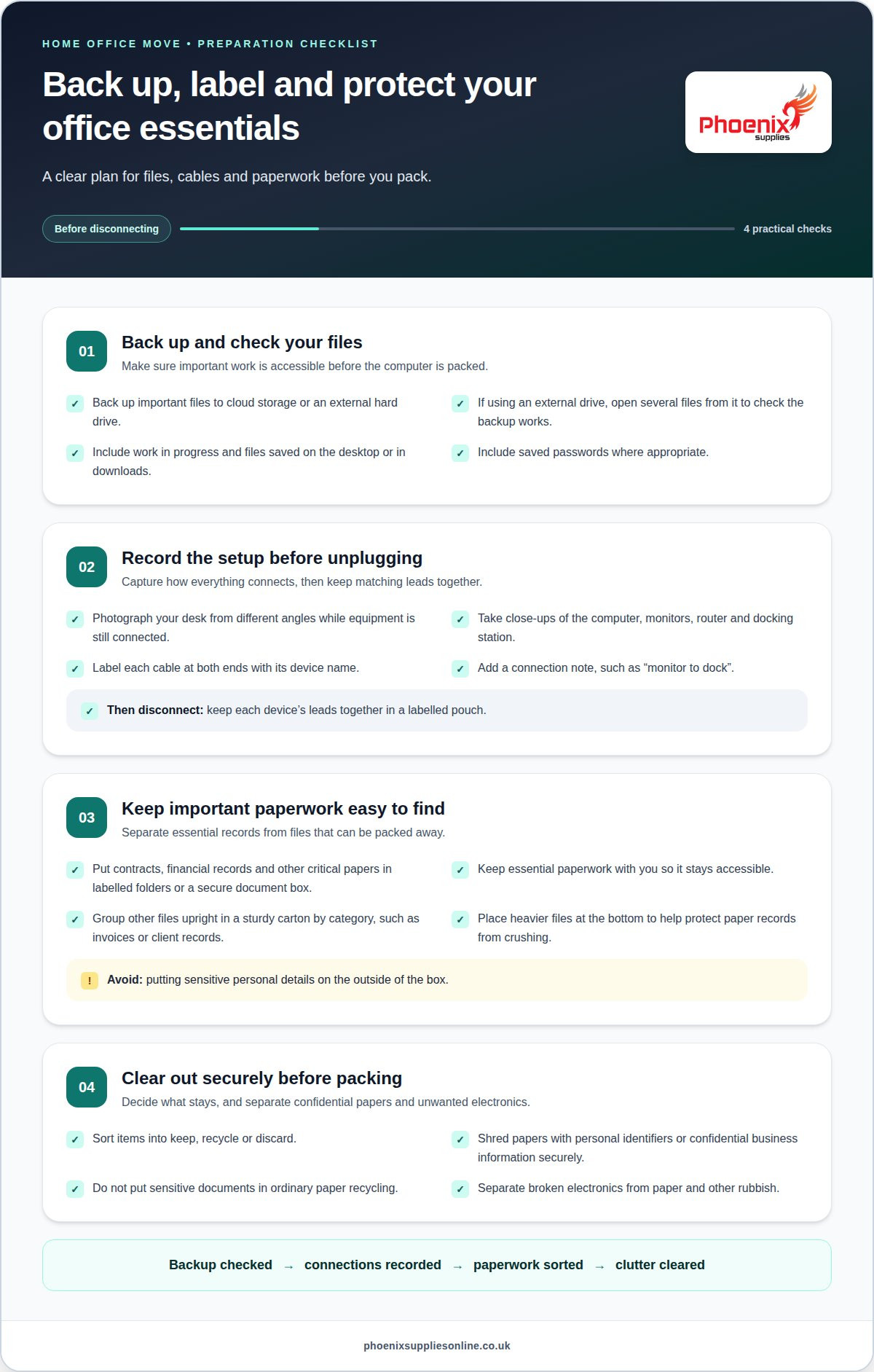
Before unplugging your computer, back up important files to cloud storage or an external hard drive. If you use an external drive, open several files from it to check that the backup works. This simple test can reveal a problem before your original computer is packed. Include work in progress, saved passwords where appropriate, and files stored on the desktop or in downloads.
Photograph your desk from different angles while the equipment is still connected. Take close-ups of the computer, monitors, router and any docking station, then label each cable at both ends with its device name. A note such as “monitor to dock” makes setup easier. Disconnect cables only after recording their positions, and keep each device’s leads together in a labelled pouch.
Sort documents before packing. Put contracts, financial records and other critical papers in labelled folders or a secure document box, and keep them with you rather than on the moving truck. This keeps essential paperwork accessible. Store other files upright in a suitable box, grouped by clear categories such as invoices, client records or household administration.
Protect paper records from spills and crushing by placing folders neatly in a sturdy carton, with heavier files at the bottom. Label the box with its contents and destination room, but avoid putting sensitive personal details on the outside. Keep it somewhere safe and accessible while you prepare the rest of the office.
Reduce clutter by deciding what to keep, recycle or discard. Don’t put documents with personal identifiers or confidential business information in ordinary paper recycling. Shred sensitive papers securely before moving, and separate broken electronics from paper and other rubbish. Once the computer and paperwork are organised, pack the remaining desk accessories safely.
2. Choose suitable boxes, anti-static wrap and furniture protection
Start by reviewing the furniture you’ll move and the layout of your new office. Measure the desk, chair and cabinets, then check the route through doorways and hallways. Sketch where each piece will go to decide what to keep, move or leave behind. If a desk won’t suit the space, remove it from your plan before packing.
Choose a box that fits each device without forcing it inside. Pack one electronic item per box and cushion it on every side. A computer should have at least two inches of padding around it. Fill gaps so the contents don’t rattle when you gently shake the closed box. Keep monitors upright during transport, and use anti-static materials around sensitive components.
Before moving larger office furniture, safely disassemble any pieces designed to come apart. Photograph desk joints and drawers first, then remove detachable shelves or legs. Put screws and fittings in a labelled pouch and secure it to the matching furniture. For modular units, use coloured tape to mark where sections join, and keep each set of hardware together.
Wrap desk edges and cabinet corners to reduce scratches. Add furniture pads or protective covers around exposed surfaces, and keep straps positioned so they don’t press directly against delicate finishes. Mattress and furniture covers can help cover larger pieces during relocation.
Label each box with its contents, destination room and handling needs, such as “computer equipment, fragile”. To unpack efficiently, group cartons by room and open the essentials first. Match each labelled cable and hardware pouch to its device or furniture before setting up.
3. Choosing packing materials
Choose packing materials for the job. Packing paper separates items that could scratch, while bubble wrap cushions delicate surfaces and small accessories. Strong tape closes carton seams, and a marker makes each box easy to identify. When planning how to pack a home office, match the material to the contents rather than using the same wrap for everything.
Consider the shape and finish of each item. Use paper around a framed print or smooth desk organiser, and bubble wrap for a fragile ornament or glass accessory. Wrap items individually if they could knock against each other. Keep tape on the outside of the wrapping so it doesn’t stick to the item.
Choose storage based on how often you need an item and whether it requires extra privacy. Keep everyday stationery in a desk drawer or open organiser, while archived paperwork can go in a closed container on a shelf. A lockable cabinet can provide a place for laptops and external hard drives when they’re not in use.
Before choosing containers for your new workspace, measure the available shelf depth and drawer space. A container that fits the room is easier to store than a pile of loose cartons. Use trays for small items such as clips and memory sticks, and give each tray a clear purpose, such as “printer supplies” or “spare stationery”.
After the move, keep frequently used materials within easy reach and less-used supplies in a cupboard or on a higher shelf. Make the storage system simple enough to maintain during a busy working week. A planned arrangement helps you use the new office well and gives every retained item a place as you finish packing and unpacking.
4. Declutter old equipment, cables and paperwork
Make an inventory before packing: list each item, its condition and whether you’ll keep it, donate it or discard it. Include the computer, monitors, printer, desk accessories and external hard drives. This gives you a clear record of what should arrive at the new office and helps identify equipment that no longer works or serves a purpose.
Test electronics you plan to keep before disconnecting them. A printer that already jams or a charger that fails intermittently may not be worth moving. Set aside unwanted working equipment for donation, and separate broken electronics from general rubbish. Keep items for recycling together so they don’t get mixed with useful office supplies during the clear-out.
Sort cables by device rather than gathering every lead into one box. Keep the power supply and accessories for each computer or monitor together, and set aside spare cables only if you know what they connect to. Remove tangled or damaged leads from your inventory. A labelled bag for each retained device keeps useful accessories organised without adding unnecessary clutter.
Sort paperwork by purpose: active work, reference files and records you no longer need. Keep current documents accessible, and separate confidential papers for secure disposal. Recycle unwanted, non-confidential paper, and group retained files by subject before packing. For example, keep invoices apart from project notes so you can find the right folder without opening every box.
Finally, prepare fragile electronics for their move. Wrap retained devices separately, add padding to prevent them shifting, and mark cartons containing screens or delicate equipment as fragile. Choose bubble wrap to cushion items such as a spare keyboard, webcam or small desk device. A tidy inventory, sorted cables and a clear keep-or-discard decision leave fewer items to pack and unpack.
Phoenix Supplies UK: Small Moving Boxes
Phoenix Supplies UK sells moving boxes to help you pack home-office equipment, paperwork and accessories for a house move. Choose Small Moving Boxes for compact items such as stationery and cables, or Medium Moving Boxes and Large Moving Boxes for larger groups of supplies. Extra Large TV Moving Boxes can hold a television or large screen.
Match each box to its contents, then label it with the items inside and the room where it belongs. This helps direct cartons during unloading and makes it easier to find what you need as you set up your workspace. If you need boxes for an office move, explore the moving box options at Phoenix Supplies UK.
Get your new workspace ready for day one
Think beyond the move itself: decide what you’ll need first in your new workspace. Keep essential work equipment and stationery easy to access, then set up your desk according to the layout you planned. With a clear approach to how to pack a home office, you can make the move a fresh start rather than carrying old clutter into your next workspace.
Choose cartons to suit what remains to pack. Phoenix Supplies UK offers Small Moving Boxes, Medium Moving Boxes and Large Moving Boxes for different office belongings. Select a size that suits each group of items to support an organised arrival and a smoother first day.
Contact Phoenix Supplies UK for packing supplies and take the next step towards getting your home office move organised. A well-planned workspace is within reach, one box at a time.
Frequently Asked Questions
What packing supplies do I need for a home office move in the UK?
Plan supplies around the items in your workspace, not just the room size. Set aside cartons for peripherals and stationery, sealable bags for small parts, and a marker for identifying contents. For an unusually shaped lamp or desktop scanner, allow extra wrapping material to protect its shape. Keep tape and labels accessible until packing is finished.
How do I pack a computer, monitor and office electronics safely for moving?
Shut down each device through its normal controls before disconnecting it, rather than cutting power while it’s running. Remove USB sticks, memory cards, discs and small wireless dongles so they don’t get lost in transit. Keep these removable items together in a compact case. At your new home, check that equipment is dry and undamaged before reconnecting or switching it on.
How do I organise and pack home office cables and accessories?
Sort accessories by their role in your setup: input devices, audio equipment, network gear and power adaptors. This makes it easier to find what you need for a specific task, such as joining a video meeting. Place small items in separate compartments or bags instead of mixing them with stationery. Keep unusual adaptors with the device that needs them.
How do I pack books, files and important documents for a house move?
Before boxing books, check for loose notes, bookmarks or receipts between the pages, and decide whether they belong with the book or elsewhere. Close ring binders and folders so papers can’t slide out during handling. If you have a work deadline soon after the move, set aside the relevant project folder and notes as a separate working set. This helps you resume the task without searching through archived material.
How do I protect a desk, office chair and other furniture during a move?
Clear desk surfaces and check drawers for pens, mugs or other loose objects that could shift. For an adjustable chair, note its height and backrest position before moving it. This gives you a useful starting point when arranging your new workstation. Keep the chair’s controls free from pressure during transit, and avoid putting smaller items on its seat where they may fall.
Should I back up or wipe computer data before moving house?
Back up files before moving a computer, but wiping it is generally only necessary if you’re passing it to someone else or disposing of it. Before handing it over, sign out of personal accounts and remove saved access details, then erase your data using the device’s built-in reset process. If you’re keeping the computer, check that you can sign in after the move.


